

Twitter Icon

Twitter

About the platform

Twitter is an American microblogging and social networking service on which users post and interact with messages known as "tweets". Registered users can post, like and retweet tweets, but unregistered users can only read them.

The PDF guide you can download below includes all the information described in the website. Feel free to share it!

DOWNLOAD PDF GUIDE
A crowd
Community guidelines icon

COMMUNITY GUIDELINES


Twitter's purpose is to serve the public conversation. Violence, harassment and other similar types of behavior discourage people from expressing themselves, and ultimately diminish the value of global public conversation. These rules are to ensure all people can participate in the public conversation freely and safely.

For violating any of the platforms rules, your account could get suspended temporarily and in some cases permanently. Read full platform rules in their community guidelines page.

  • Safety
    • Violence
    • Terrorism/violent extremism
    • Child sexual exploitation
    • Abuse/harassment
    • Hateful conduct
    • Suicide or self-harm
    • Sensitive media, including graphic violence and adult content
    • Illegal or certain regulated goods or services
  • Privacy
    • Private information
    • Non-consensual nudity
  • Authenticity
    • Platform manipulation and spam
    • Civic Integrity
    • Impersonation
    • Synthetic and manipulated media
    • Copyright and trademark

Algorithm icon

THE ALGORITHM


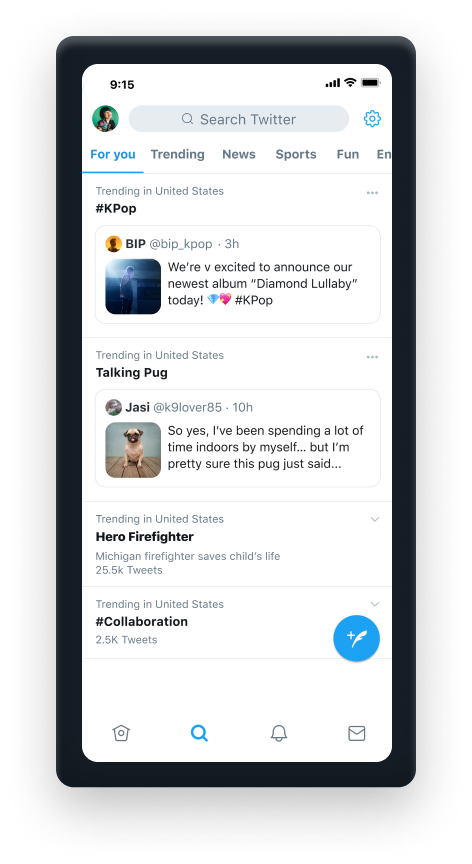
Twitter’s ranking signals include recency, relevance, engagement, rich media, and other factors.

It adds up to a complex series of calculations based on what people have liked in the past, what people like them like, and more.

Twitter users can toggle between two different Twitter timelines: Top Tweets and Latest Tweets.

Latest Tweets shows people their followers’ tweets in real-time. Top Tweets uses the Twitter algorithm to shuffle posts in what it suggests as a better order.

Twitter Algorithm Screenshot

Explore more about the other social media platforms:

Facebook Logo

GUIDE TO

FACEBOOK

Instagram Logo

GUIDE TO

INSTAGRAM

TikTok Logo

GUIDE TO

TIKTOK

TikTok Logo

GUIDE TO

TWITTER

Explore more about the other social media platforms:

CONTENT MODERATION

Content moderation

There are different types of Twitter tracking: historical Twitter reports, which analyze old tweets; and real time Twitter analytics which analyze tweets in streaming. Twitter monitors data from any time and hashtag, term, keyword or account.

Regarding content moderation, Twitter takes a very different and unique approach compared to fellow social media giants like Facebook.

Twitter portrays itself as making policies in public and tries to focus on providing context for the users of the platform about issues of misinformation, hate speech etc rather than deciding what must go or stay, hence, the user is provided information to decide if they want to keep seeing such content or not.

DATA BEING MONITORED icon

DATA BEING MONITORED


Examples of data being monitored:

  • The HasHtags you use
  • The likes you get
  • what you share to other apps
  • Your caption text
  • the audio you use
  • the comments you get
  • The Text in the video
  • The photos you send
  • The documents you send
  • Your Contacts
  • Your profile Picture
  • Your IP Adress
  • Who you text most
Telegram_IMG1_Algorithm
CONTENT MODERATION icon

CONTENT MODERATION


On certain issues, Twitter does not negotiate. An instance is seen where Jack, Twitter’s CEO tweeted in July 2019 “We’ve made the decision to stop all political advertising on Twitter globally. We believe political message reach should be earned, not bought.”

Twitter portrays itself as making policies in public and tries to focus on providing context for the users of the platform about issues of misinformation, hate speech etc rather than deciding what must go or stay, hence, the user is provided information to decide if they want to keep seeing such content or not.

Anyone can report abusive behavior directly from a Tweet, profile, or Direct Message. If you do want to report content on Twitter, you can find the steps below.

Explore more about the other social media platforms:

Facebook Logo

GUIDE TO

FACEBOOK

Instagram Logo

GUIDE TO

INSTAGRAM

TikTok Logo

GUIDE TO

TIKTOK

TikTok Logo

GUIDE TO

TWITTER

Explore more about the other social media platforms:

HOW TO REPORT CONTENT

How to report content

Below you will find the exact steps on how to report a tweet, an account, and a conversation/message.

CONTENT REPORTING icon

REPORTING


  • How to report a tweet
    1. Click the three in the top right of the tweet.
    2. Click report tweet.
    3. Select It’s abusive or harmful.
    4. Next, they’ll ask you to provide more information about the issue you’re reporting. We may also ask you to select additional Tweets from the account you’re reporting so we have better context to evaluate your report.
    5. They will include the text of the Tweets you reported in our follow-up emails and notifications to you. To opt-out of receiving this information, please uncheck the box, next to Updates about this report can show these Tweets.
    6. Once you’ve submitted your report, they’ll provide recommendations for additional actions you can take to improve your Twitter experience.

  • How to report an account
    1. Go to the account profile and click or tap the overflow icon
    2. Click report.
    3. Select It’s abusive or harmful.
    4. Next, they’ll ask you to provide additional information about the issue you’re reporting. We may also ask you to select Tweets from that account so we have better context to evaluate your report.
    5. We will include the text of the Tweets you reported in our follow-up emails and notifications to you. To opt-out of receiving this information, please uncheck the box next to Updates about this report can show these Tweets.
    6. Once you’ve submitted your report, they’ll provide recommendations for additional actions you can take to improve your Twitter experience.

  • How to report a conversation / message
    1. Click into the Direct Message conversation and find the message you’d like to report. (To report the entire conversation, click the more icon)
    2. Hover over the message and click the Report message icon when it appears.
    3. You can also click on the information icon and select Report @username.
    4. If you select It's abusive or harmful, they’ll ask you to provide additional information about the issue you’re reporting. We may also ask you to select additional messages from the account you’re reporting so we have better context to evaluate your report.
    5. Once you’ve submitted your report, we’ll provide recommendations for additional actions you can take to improve your Twitter experience.
      Note: Additionally, you have the option of reporting a conversation from a group message.

Explore more about the other social media platforms:

Facebook Logo

GUIDE TO

FACEBOOK

Instagram Logo

GUIDE TO

INSTAGRAM

TikTok Logo

GUIDE TO

TIKTOK

TikTok Logo

GUIDE TO

TWITTER

Explore more about the other social media platforms:

How to recover from a ban

HOW TO RECOVER FROM A BAN

Twitter may lock an account or place temporary limitations on certain account features if an account appears to be compromised or in violation of the Twitter Rules or Terms of Service. If you log in or open your app and see a message that your account is locked or that some of your account features have been limited, follow the instructions to restore it or continue reading for more information.

Unfortunately, the system of content moderation sometimes means that content creators always have to be careful not to be mistakenly classified and kicked out of the platform.

CONTENT MODERATION icon

STEPS TO APPEAL


How to recover a limited account
  1. Log in to your account
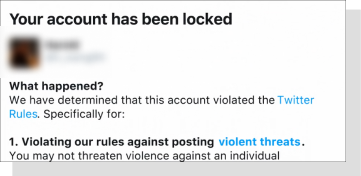
  2. Look for the message letting you know Your account has been locked.
  3. Click or tap Start.
  4. Enter your phone number. Please note that we will associate this phone number with your account.
  5. We will send you a text message, or you will receive a phone call, with a verification code. It may take a few minutes for the code to be delivered to your phone.
  6. Once you’ve entered the verification code, click or tap Submit to unlock your account.
  7. If you have an email address associated with your account, we also sent instructions to that address. If you don’t see an email from us, please check your spam, junk and social folders.
  8. Contact their support team if you need additional help unlocking your account.
  9. If your account is in this state, people who visit your profile may see a message letting them know the account has displayed unusual activity and asking them to confirm they still want to view it.
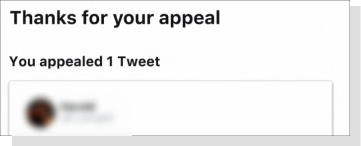
How to appeal a blocked account on twitter
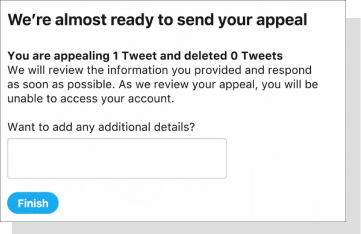
How to appeal a blocked account on twitter next step
How to appeal a blocked account on twitter last step

Explore more about the other social media platforms:

Facebook Logo

GUIDE TO

FACEBOOK

Instagram Logo

GUIDE TO

INSTAGRAM

TikTok Logo

GUIDE TO

TIKTOK

TikTok Logo

GUIDE TO

TWITTER

Explore more about the other social media platforms:

YOUR VOICE MATTERS

We are actively seeking your feedback and comments to our guide. Your contribution will help us built the information database to help people tackle issues of unfair cencorship.

If you want to share your personal cencorship story with us, be sure your story will be anonymized.

If you uncover a new content moderation policy or technique, please feel free to reach out and make platforms like ours aware of it.

info@guideagainstaitracking.com