Facebook Icon

Facebook

About the platform

Facebook has been involved in very many issues where content moderation has put the giant in a bad place - where it must choose to either regulate the content it’s users share or lean towards the proponents of freedom of expression.

The PDF guide you can download below includes all the information described in the website. Feel free to share it!

DOWNLOAD PDF GUIDE
A crowd
Community guidelines icon

COMMUNITY GUIDELINES


The complex problem has remained the decision about choosing what content must be regulated and how versus the infringement on freedom of expression that regulating content brings along. While that debate raves on, the focus here is to understand and condense Facebook community guidelines and how content creators can stay off the hook of the content police.

  • Violence and criminal behaviour
  • Safety
  • Objectionable content
  • Integrity and authenticity
  • Respecting intellectual property
Algorithm icon

THE ALGORITHM


Facebook has devoted so much resources to developing sophisticated Artificial Intelligent Systems to combat the range of content moderation issues from the field of computer vision to Natural Language processing (NLP).

For instance, to combat a problem with images, where users distort an image to give it a new meaning, in a research published in May 2019, facebook researchers explored a model for understanding images and memes at a deeper level. The model has the ability to detect an image, distorted or altered to convey the different messages.

Telegram_IMG1_Algorithm

Explore more about the other social media platforms:

Facebook Logo

GUIDE TO

FACEBOOK

Instagram Logo

GUIDE TO

INSTAGRAM

TikTok Logo

GUIDE TO

TIKTOK

TikTok Logo

GUIDE TO

TWITTER

Explore more about the other social media platforms:

CONTENT MODERATION

Content moderation

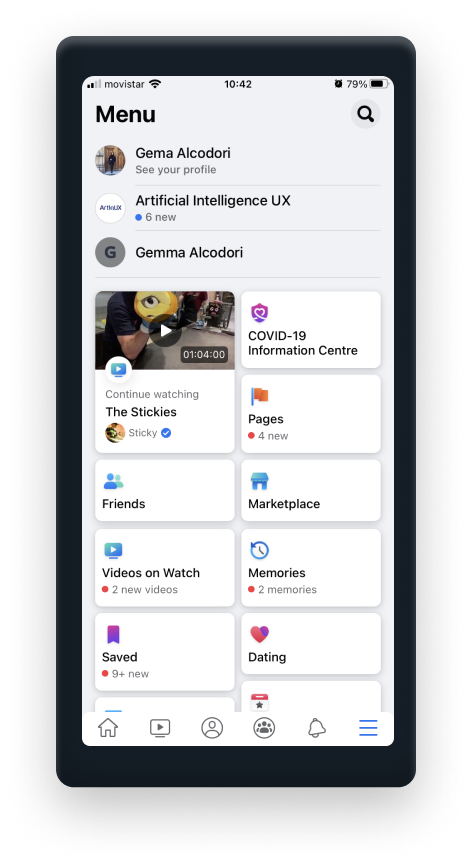
If you want to use Facebook, you give it permission to log your activity on the site: where you check into, the groups you join, who you interact with. This data is primarily used to serve up advertising that's more relevant to you, which in turn makes more money for Facebook.

You can't really stop Facebook from collecting this information—it's the deal you make when you sign up. Facebook's reach also goes way beyond Facebook itself. It has partnerships with a whole host of marketing firms and ad networks.

Below you will see the data that Facebook monitors in general.

DATA BEING MONITORED icon

DATA BEING MONITORED


Examples of data being monitored:

  • Images
  • Videos watched
  • Captions and messages
  • LIKED Pages
  • Saved items
  • Events
  • Marketplace interests
Facebook_IMG2_DataMonitoring
CONTENT MODERATION icon

CONTENT MODERATION


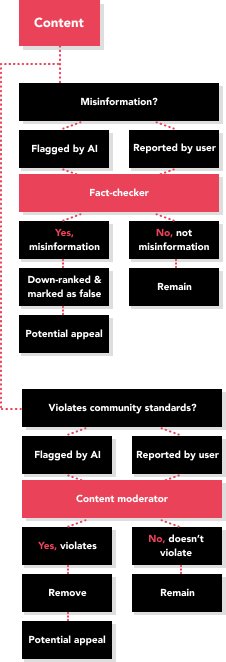
Facebook uses a combination of humans and AI to manage the issue of content moderation.

However, recently Facebook, after many criticisms, have shared publicly the policies that it’s thousands of content moderators use when checking if your content is worthy of sharing on its platform or not. Humans are needed because there have been very many cases where AI has wrongly miscategorized content and users got penalized for this mistake.

Telegram_IMG1_Algorithm

Explore more about the other social media platforms:

Facebook Logo

GUIDE TO

FACEBOOK

Instagram Logo

GUIDE TO

INSTAGRAM

TikTok Logo

GUIDE TO

TIKTOK

TikTok Logo

GUIDE TO

TWITTER

Explore more about the other social media platforms:

HOW TO REPORT CONTENT

How to report content

The best way to report abusive content or spam on Facebook is by using the Report link near the content itself. The list below summarized the types of content you can report along with steps on how to do it.

  • Profiles
  • Posts
  • Posts on Your Timelines
  • Photos and Videos
  • Messages
  • PAGES
  • GROUPS
  • EVENTS
  • COMMENTS
  • ADS ON FACEBOOK
CONTENT REPORTING icon

REPORTING


  • How to report photos & videos
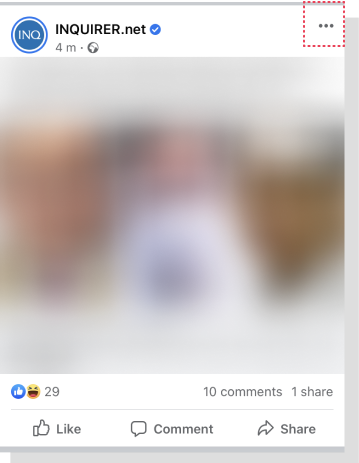
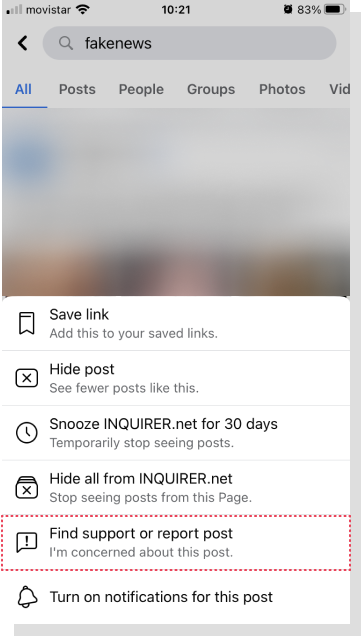
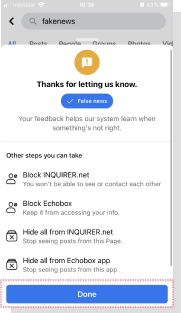
    1. Click on the photo or video to expand it. If the profile is locked and you can't view the full-sized photo, click Find support or report photo.
    2. Click the three to the right of the photo or video.
    3. Click Find Support or Report Photo for photos or Report Video for videos.
    4. Select the option that best describes the issue and follow the on-screen instructions.
Steps to report a photo or video

Did you know?

The Oversight board is a Facebook construct meant to independently review content moderation cases of high importance.

The board is independent of Facebook and funded by an independent trust. The concept was introduced in 2018 as a way for Facebook to transparently allow an independent body of experts to assist with difficult decisions as well as advise Facebook on policy changes.

Explore more about the other social media platforms:

Facebook Logo

GUIDE TO

FACEBOOK

Instagram Logo

GUIDE TO

INSTAGRAM

TikTok Logo

GUIDE TO

TIKTOK

TikTok Logo

GUIDE TO

TWITTER

Explore more about the other social media platforms:

How to recover from a ban

HOW TO RECOVER FROM A BAN

Facebook lets users appeal the decision to take down or flag their post. “This means you may see the option to Disagree with Decision instead of Request Review.” When you Disagree with Decision, Facebook may not be able to follow up with you, but they receive the feedback and feed it back into their frameworks for decision making.

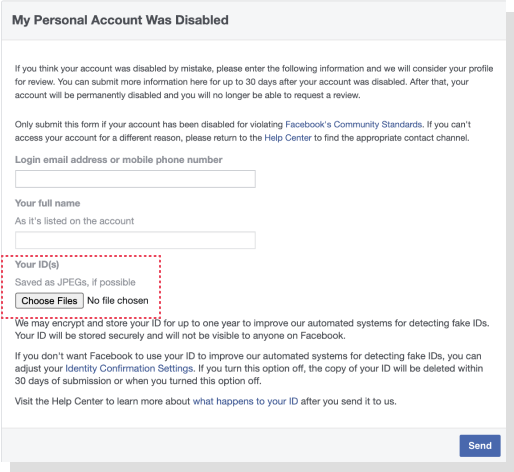
How do you know if your Facebook account has been disabled? If your Facebook account has been disabled, you'll see a message saying your account is disabled when you try to log in.

CONTENT MODERATION icon

STEPS TO APPEAL


Why has your account been disabled?

Facebook disabled accounts that don't follow the Facebook Terms. Some examples include:

  1. Posting content that doesn't follow the Facebook Terms.
  2. Using a fake name.
  3. Impersonating someone.
  4. Continuing behavior that's not allowed on Facebook by violating our Community Standards.
  5. Contacting other people for the purpose of harassment, advertising, promoting, or other conduct that's not allowed.
Why has your account been disabled?

To help ensure IDs used for identity confirmation are real, they use both manual review and automated systems. This helps detect and prevent risks such as impersonation or ID theft, keeping you and our Facebook community safe.

To help improve the systems for detecting fake IDs and related abuse, they may securely store your ID for up to 1 year. They’ll let you know at the time if we do this, and you can change this at any time in your Identity Confirmation Settings.

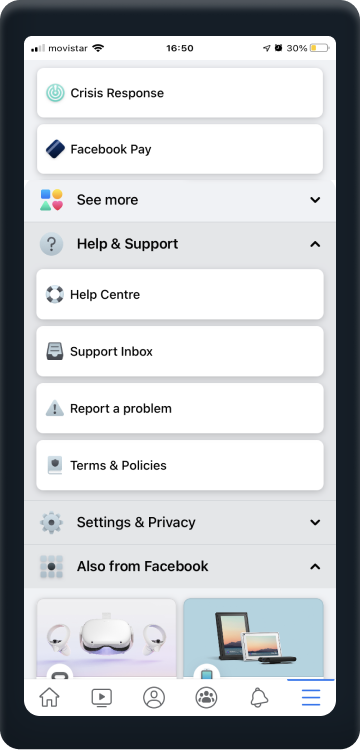
1

Tap on three lines button to access your Support Inbox

2

Tap the Your Violations menu

3

Open the message about taking your content down and tap on Request Review

4

Once you request a review, your content will be reviewed again by Facebook, usually within 24 hours. If the reviewers find they've made a mistake, you’ll be informed, and your post, photo or video will be restored.

If you request a review and still don’t agree with the decision, you may be able to appeal to the Oversight Board.

* Note that one can only appeal to the Oversight Board if Facebook has taken down content and that decision has already been appealed by requesting a review that was upheld to be a violation of the Community Standards.

If your Facebook content decision is eligible for review by the Oversight Board, you'll see an Oversight Board Reference ID within your Support Inbox.

Explore more about the other social media platforms:

Facebook Logo

GUIDE TO

FACEBOOK

Instagram Logo

GUIDE TO

INSTAGRAM

TikTok Logo

GUIDE TO

TIKTOK

TikTok Logo

GUIDE TO

TWITTER

Explore more about the other social media platforms:

YOUR VOICE MATTERS

We are actively seeking your feedback and comments to our guide. Your contribution will help us built the information database to help people tackle issues of unfair cencorship.

If you want to share your personal cencorship story with us, be sure your story will be anonymized.

If you uncover a new content moderation policy or technique, please feel free to reach out and make platforms like ours aware of it.

info@gaait.policylabafrica.org