

Telegram Icon

Telegram

About the platform

Telegram is a freeware, cross-platform cloud-based instant messaging, video calling, and VoIP service, developed in Russia. It is clearly committed to protecting freedom of expression and user privacy above all else, which made the platform attractive to people who fear censorship - both for the good and the bad.

Content moderation for social media platforms is a front burner conversation now. Mostly because the decision to take down content by the social media outfits generates debates around freedom of expression versus protection of the community.

The PDF guide you can download below includes all the information described in the website. Feel free to share it!

DOWNLOAD PDF GUIDE
A crowd
Community guidelines icon

COMMUNITY GUIDELINES


With nearly 500 million users Telegram has been involved in many scandals, where too little content moderation has put the platform in a bad light. Telegram's privacy features have made the messaging app popular for anyone who does not want their identity disclosed, no matter what they post.

Unlike publicly traded social media companies, Telegram does not police content as proactive as the giant competitors. In fact, Telegram is banned in Russia and Iran because the company refuses to give any government access to user data.

  • Sending spam or scam
  • Promote violence
  • Illegal pornographic content
Algorithm icon

THE ALGORITHM


Telegram provides end-to-end encrypted calls and optional end-to-end encrypted "secret" chats between two online users on smartphone clients, whereas cloud chats use client-server/ server-client encryption.

The transmission of messages to Telegram Messenger LLP servers is encrypted with the service's MTProto protocol. According to Telegram's privacy policy, "all data is stored heavily encrypted and the encryption keys in each case are stored in several other data centers in different jurisdictions. This way local engineers or physical intruders cannot get access to users' data".

They may also use automated algorithms to analyze messages in cloud chats to stop spam and phishing.

Telegram_IMG1_Algorithm

Explore more about the other social media platforms:

Facebook Logo

GUIDE TO

FACEBOOK

Instagram Logo

GUIDE TO

INSTAGRAM

TikTok Logo

GUIDE TO

TIKTOK

TikTok Logo

GUIDE TO

TWITTER

Explore more about the other social media platforms:

CONTENT MODERATION

Content moderation

On promoting violence and posting illegal pornographic content, Telegram does not negotiate. They have integrated an ‘ISIS watch’ and ‘Stop Child Abuse’ channel, where they daily report how many bots and channels they have removed.

There are a few other guidelines on what Telegram frowns at and has zero tolerance for, unfortunately, the system of content moderation sometimes means that content creators always have to be careful not to be mistakenly classified and be banned temporarily or permanently.

Below you will see the data that Telegram monitors in general.

DATA BEING MONITORED icon

DATA BEING MONITORED


Examples of data being monitored:

  • The messages you Send
  • The videos you send
  • Your mobile Number
  • Your Username
  • your about info
  • The devices you use
  • The photos you send
  • The documents you send
  • Your Contacts
  • Your profile Picture
  • Your IP Adress
  • Who you text most
Telegram_IMG1_Algorithm
CONTENT MODERATION icon

CONTENT MODERATION


In their Privacy Policy, Telegram states the following about monitoring issues in content:

  • For private messages, it’s up to the receiver to decide if content is unwelcomed. It could be a simple ‘hello’ being reported, which leads to you being blocked temporarily.
  • As a general rule, people do mind getting unsolicited advertisements, links, invite links to groups or channels, random photos and, above all, anything related to commerce or online popularity. If you send them something like this, you will be blocked.

Unspoken rules:

Many reasons can lead to a telegram report, and sending spam and harassment messages to other users is just one example. In general, the main reasons that may lead to the ban of telegram users are mentioned in below:

  • Send spam messages through advertising bots
  • Joining illegal channels and groups whose contents is contrary to the Telegram laws
  • Send over 100 private messages in one day to strangers
  • Use unauthorized stickers
  • Forwarding spam links or activating bots which may harm other users.
  • Send duplicate and promotional messages to anonymous telegram users.

Explore more about the other social media platforms:

Facebook Logo

GUIDE TO

FACEBOOK

Instagram Logo

GUIDE TO

INSTAGRAM

TikTok Logo

GUIDE TO

TIKTOK

TikTok Logo

GUIDE TO

TWITTER

Explore more about the other social media platforms:

HOW TO REPORT CONTENT

How to report content

If you want to report someone you can contact the @notoscam bot that belongs to Telegram( but you shouldn’t expect a high response-rate). To start, you just have to type the name ‘antiscam’ in the search bar inside your telegram app and start chatting with the bot or forward messages you want to report to it. Below you find other ways of reporting.

CONTENT REPORTING icon

REPORTING


  • How to report a person
    1. Open the chat with a user that you want to repost.
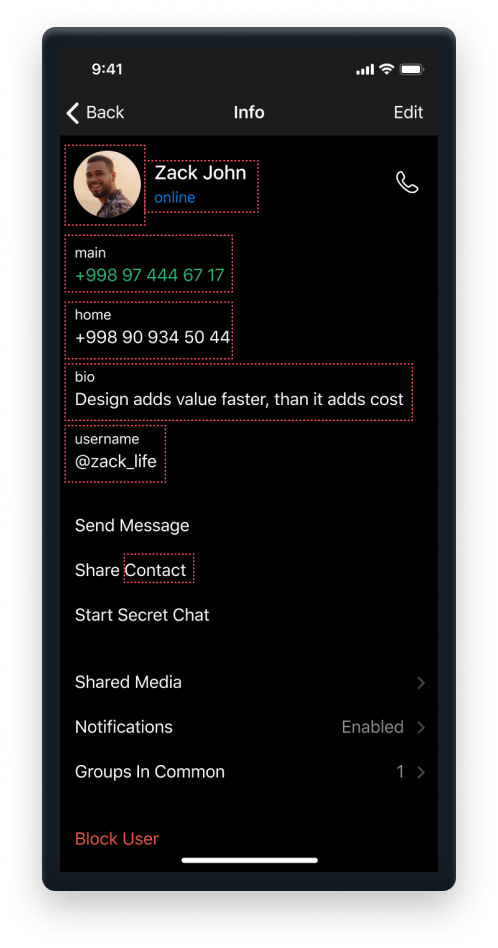
    2. Open the user’s profile by clicking on their profile picture, or on their avatar icon on the top of your phone’s screen.
    3. Find their username, tap on it, and click the copy option
    4. You will have to open your Gmail on your phone, or your Outlook mail.
    5. Click on the Compose a new email button.
    6. Make the email to abuse@telegram.org. In the message section, type in why do you want to report that user. Make the message as long as possible with many details. Even consider taking a screenshot of your chat with that person and adding it in the email as an attachment.
    7. Hold your finger on your phone, and click on the Paste option. This is going to paste the previously copied username of the abusive user.
    8. When you are done writing that email, click on the Send button in the top right corner of your screen.

  • How to report a group
    1. Open your Telegram App.
    2. Open the group you want to report.
    3. Click on the groups profile picture.
    4. Press the ‘Report’ button.
    5. Choosen either ‘Spam’, ‘Violence’, ‘Pornography’ or ‘Other’.
    6. Explain why you want to report the group and mention the user’s name and username of the person that is posting harrassing content.
    7. Tap send.

  • How to report a channel
    1. Open your Telegram App.
    2. Open the channel you want to report.
    3. Click on the the dots in the upper right corner.
    4. Press the ‘Report’ button.
    5. Choosen either ‘Spam’, ‘Violence’, ‘Pornography’ or ‘Other’.
    6. Tap report.
    Some Tips To Staying Safe On Telegram
  • Add a fingerprint lock, or the pass lock to your Telegram app so that no one else could access it, and read your messages on your phone.
  • Have end-to-end encryption chat with a person if you want to stay safe and have a private chat that no one else could read except you.
  • When sending media files to someone, use the self-destruction option. In other words, that option will delete the media files that you just sent to a user after they have viewed it.

Explore more about the other social media platforms:

Facebook Logo

GUIDE TO

FACEBOOK

Instagram Logo

GUIDE TO

INSTAGRAM

TikTok Logo

GUIDE TO

TIKTOK

TikTok Logo

GUIDE TO

TWITTER

Explore more about the other social media platforms:

How to recover from a ban

HOW TO RECOVER FROM A BAN

If a person or a bot reports you, your account becomes limited temporarily. You can still send messages to people who you have their number saved as a contact. You can also always reply to anyone who messages you first.

Tho you cannot send messages to non-contacts anymore or into groups. If this happened to you for the first time, most likely your account will be limited for a few days. Being reported repeatedly will result in longer periods of being blocked.

Once reported, recovering runs through contacting a bot and all reports wishing for recovery are checked by human moderators.

CONTENT MODERATION icon

STEPS TO APPEAL


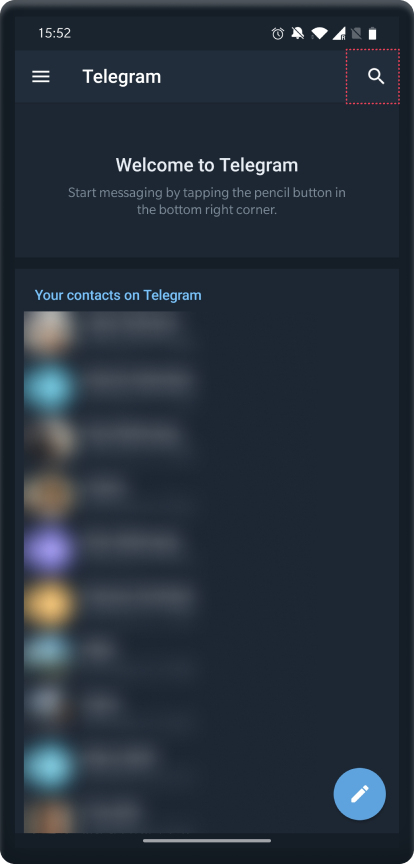
1

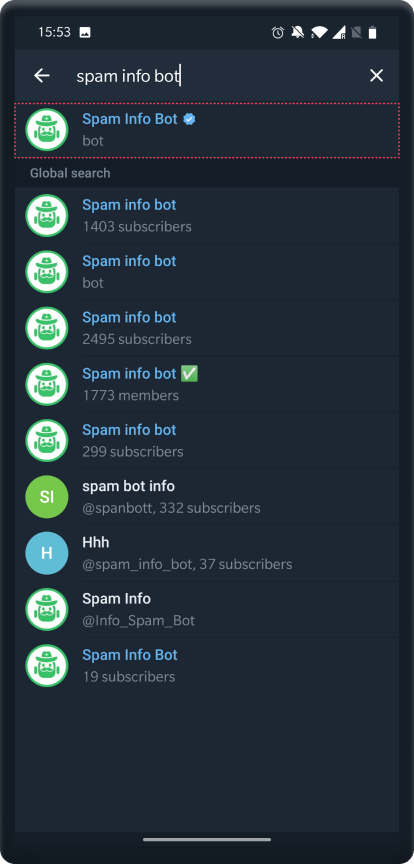
Tap the search icon
 

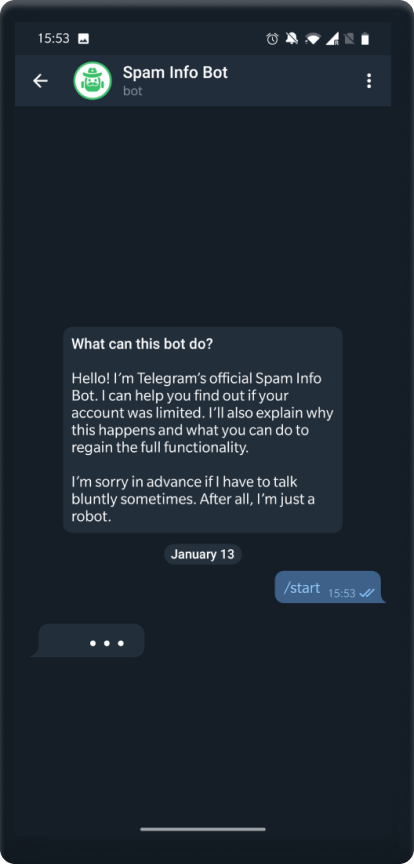
2

Search for @SpamBot and tap to open it

3

Tap the start/restart button to iniciate the bot

4

Follow the bots instructions to recover

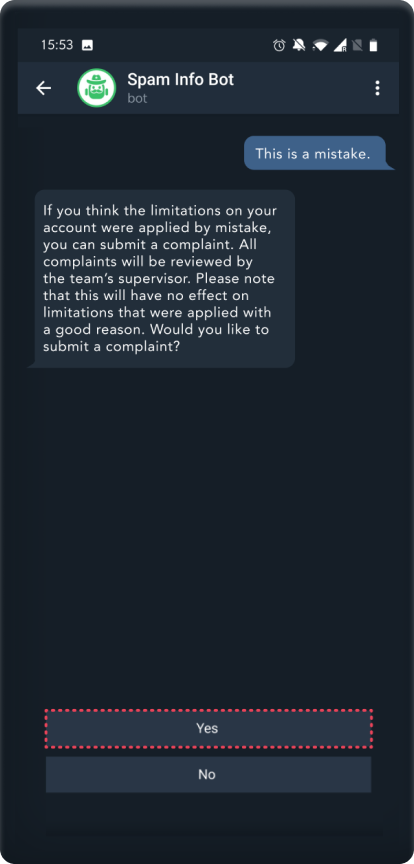
5

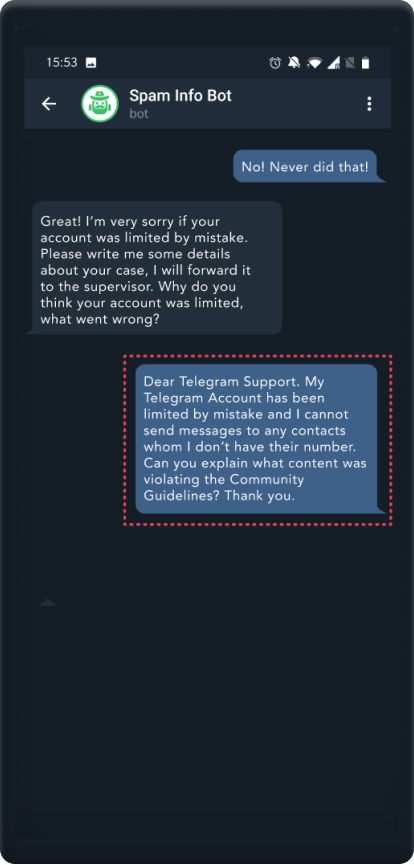
Tap the ‘This is a mistake’ button

6

Select ‘Yes’ to submit a complaint

7

Select ‘No! Never did that!’ to appeal the ban

8

Explain your case to the bot
 

You will receive a message shortly after you send the explanation. The bot will state the review date, and if the moderator approves, your report will be removed.

Explore more about the other social media platforms:

Facebook Logo

GUIDE TO

FACEBOOK

Instagram Logo

GUIDE TO

INSTAGRAM

TikTok Logo

GUIDE TO

TIKTOK

TikTok Logo

GUIDE TO

TWITTER

Explore more about the other social media platforms:

YOUR VOICE MATTERS

We are actively seeking your feedback and comments to our guide. Your contribution will help us built the information database to help people tackle issues of unfair cencorship.

If you want to share your personal cencorship story with us, be sure your story will be anonymized.

If you uncover a new content moderation policy or technique, please feel free to reach out and make platforms like ours aware of it.

info@gaait.policylabafrica.org